
Buy Ergonomic Tech Gear Online in 2026: Top Picks
Table of Contents
- Best Ergonomic Office Gear 2026: What's Actually Worth Buying
- Laptop Stands and Screen Positioning for Better Posture
- Ergonomic Keyboard for Work: What to Look For
- Ergonomic Mouse for Remote Work: A Practical Guide
- How to Choose Ergonomic Tech Gear That Fits Your Setup
- Buying Ergonomic Tech Gear Online Safely: What to Check
- Conclusion
- Frequently Asked Questions
Last Updated: October 21, 2026
Best Ergonomic Office Gear 2026: What's Actually Worth Buying
If you plan to buy ergonomic tech gear online in 2026, the smartest starting point is the piece that changes your posture the most: a laptop stand that lifts the screen to eye level.

Ergonomic tech gear is equipment designed to keep your body in a neutral position while you work, including stands, keyboards, mice, and support accessories.
Below, we break down what is genuinely worth buying, what to skip, and how to choose gear that fits your body and your desk.
| Gear type | Fixes | Priority | Typical spend |
|---|---|---|---|
| Laptop stand | Screen height, hunching | Buy first | Budget-friendly |
| Ergonomic keyboard | Wrist posture, typing comfort | Buy second | Mid-range |
| Vertical mouse | Hand and forearm angle | Buy third | Mid-range |
| Desk organization | Clutter, desk space | Optional | Low cost |
Laptop Stands and Screen Positioning for Better Posture
The best laptop stand is one that raises your screen so the top third sits at eye level, which is the single biggest change most home-office setups need.
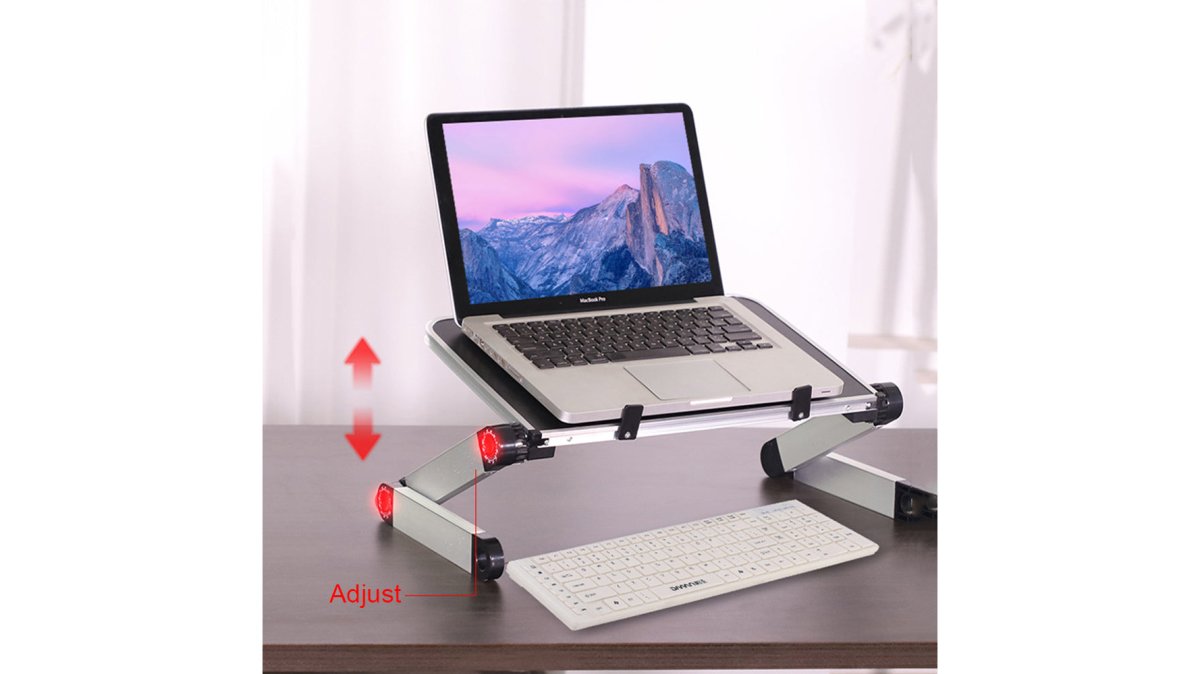
Our pick is the Foldable Laptop Stand Ergonomic Desk Tablet Holder at $31.99.
The aluminum alloy, MDF, and ABS build keeps it light at 744 g, and it folds flat for storage, which matters if your desk doubles as a dining table.
A common mistake is buying a fixed-height riser. If you are shorter or taller than average, you need adjustability or you trade one bad angle for another.
Ergonomic Keyboard for Work: What to Look For
An ergonomic keyboard for work should let your wrists float in a straight line rather than bending upward or outward.
The keyboard category splits into practical shapes, and the right one depends on your symptoms and your desk:
- Compact straight boards (60-75% layout). These keep your mouse hand closer to your body, which reduces shoulder reach. Best for users with average-width shoulders and limited desk depth. Trade-off: you lose the number pad, so heavy spreadsheet work suffers.
- Tenkeyless (TKL) boards. A middle ground that keeps arrow keys and function rows while trimming width. A common pattern is that TKL boards suit users who want a familiar layout but notice their mouse arm drifting outward.
- Split keyboards. Two halves that let your shoulders relax and your wrists stay straight. Best for users with forearm or wrist fatigue after long typing sessions. Trade-off: a learning curve of roughly one to two weeks, and they take more desk space.
- Curved or tented boards. Raise the center so your hands sit in a handshake angle rather than palm-down. Best for users with wrist pain that worsens through the day. Trade-off: they are bulkier and harder to travel with.
Three measurable factors decide whether a keyboard actually helps:
- Tilt control. Flat or slightly negative beats a raised back edge. Check whether the board has flip-out feet or a fixed slope; a fixed positive slope is the most common cause of wrist extension.
- Key travel and actuation force. Shallow, quiet keys reduce finger fatigue on long sessions. If a listing does not state travel distance or actuation force, treat that as a missing specification.
- Width and reach. A narrower board keeps your mouse hand closer to your body. Measure your shoulder width and desk depth before choosing a full-size board.
Fit by body size matters more than most guides admit. Taller users often need a wider board and a wrist rest that does not force their elbows outward.
Keyboard comfort depends on where your hands land, not on the keyboard alone. Before buying, place your hands on your current board and check three things: are your wrists straight, are your elbows at roughly 90 degrees, and is your mouse within easy reach?
If you take calls while typing, pairing the board with a wireless lavalier microphone at $52.20 keeps your hands free and your neck out of a cradled-phone position. It runs 6 to 8 hours per charge.

Ergonomic Mouse for Remote Work: A Practical Guide
The right ergonomic mouse for remote work keeps your hand in a handshake position rather than palm-down, which reduces the forearm rotation that causes most mouse-related strain. A vertical shape, adjustable sensitivity, and a size that matches your grip are the three factors that matter.
There are common ergonomic mouse shapes, and each solves a different problem:
- Vertical mice. Rotate your hand toward a handshake angle. Best for users with forearm or wrist discomfort from palm-down clicking. Trade-off: they feel awkward for the first few days and are less precise for fast gaming-style cursor work.
- Trackball mice. Keep the hand stationary and move the cursor with a thumb or finger ball. Best for users with shoulder or elbow strain from repeated arm movement. Trade-off: a learning curve of about a week, and thumb-ball models can strain the thumb if used heavily.
- Contoured or sculpted mice. Fill the palm and support the arch of the hand. Best for users with palm grip and general hand fatigue. Trade-off: they are handed-specific, so sharing a desk becomes awkward.
- Compact travel mice. Small and light for laptop bags. Best for occasional travel use. Trade-off: they force fingers to curl tightly, so they are a poor choice as a primary all-day mouse.
Here is how we would choose by symptom and body size:
- Measure your hand from wrist to fingertip. Under 17 cm, pick a compact vertical or contoured mouse. Over 19 cm, pick a larger sculpted model so your fingers do not curl tightly.
- Match the shape to your grip. Palm grip needs a taller back; fingertip grip needs a shorter one; claw grip needs a pronounced hump.
- Match the shape to your symptom. Forearm or wrist discomfort points to vertical. Shoulder or elbow strain points to trackball. General hand fatigue points to contoured.
- Check the connection. Wireless removes cable drag, which is a real source of shoulder tension. Confirm the wireless type and battery life before buying.
- Set sensitivity low enough that small wrist movements move the cursor, not your whole arm.
A common mistake is going too small. A mouse that forces your fingers to curl tightly causes more strain than the flat mouse you replaced. Another common mistake is switching to a vertical mouse while keeping the mouse far from the keyboard; the reach, not the shape, is often the real culprit.
Foldable Laptop Stand Ergonomic Desk Tablet Holder →
If you use a laptop on the go, a compact mouse pairs well with a foldable stand so your screen height and hand position stay consistent between home and travel setups.
How to Choose Ergonomic Tech Gear That Fits Your Setup
Choosing ergonomic tech gear comes down to fit: your body measurements, your work style, and where the discomfort actually shows up. Start with the symptom, then buy the gear that addresses it, not the gear that gets the most attention online.
Work through it in this order:
- Neck or upper back ache by lunchtime? Screen height. Buy a stand.
- Wrist or forearm fatigue after typing? Keyboard tilt and wrist support.
- Hand or thumb soreness from clicking? Mouse shape and sensitivity.
- General restlessness and fidgeting? Desk organization and cable management.
Body size changes the answer. Taller users need more stand height and a wider keyboard to avoid rounding the shoulders inward. Shorter users often need a footrest before any peripheral, because dangling feet pull the whole posture forward.
This is also where desk space matters. A foldable stand that stores flat and a compact capsule power bank at $27.83 keep the surface clear, and a clear desk is easier to reset into a good posture every morning.

Buying Ergonomic Tech Gear Online Safely: What to Check
Buying ergonomic tech gear online safely means verifying four things before checkout: the load rating, the material and dimensions, the return window, and whether the seller lists real specifications rather than vague claims. Those four checks separate a useful purchase from a return.
Run this checklist before you pay:
- Load rating stated in kilograms, not "heavy duty"
- Full dimensions and weight listed
- Materials named, not just "premium"
- Compatibility confirmed for your device size
- Return and warranty terms visible on the product page
- Real product photos, not only renders
Compatibility and setup trip people up more than quality does. For a phone mount, the extendable selfie stick tripod at $20.99 supports phones up to 3.4 inches wide and extends from 7.6 to 38.1 inches, so the spec is there to check against your device.
Long-term value deserves a mention too. A $31.99 stand that lasts years costs less than three cheap risers that crack. Repairable, simple designs with fewer moving parts usually win on total cost.
Conclusion
The hard part of buying ergonomic gear is not finding options, it is resisting the urge to buy everything at once.
HJ Accessories stocks the practical end of this category: a foldable laptop stand with 360-degree angle adjustment and a 10 kg load rating, a compact capsule power bank for travel days, and wireless lavalier microphones for hands-free calls. Free shipping applies over $25.
Check out the HJ Accessories collection and build a workstation that fits your body, not the other way around.
Frequently Asked Questions
What ergonomic tech gear is worth buying for a home office?
Start with the items that change your posture most: a laptop stand to raise the screen to eye level and an external keyboard and mouse so your wrists stay neutral. A foldable laptop stand with 360-degree angle adjustment, like the one from HJ Accessories at $31.99, handles the screen height without taking up much desk space. Add a wireless charger to cut cable clutter. Skip novelty gadgets until these basics are in place.
How do I choose an ergonomic keyboard for work?
Match the keyboard to how you type. Look for a layout that keeps your wrists straight rather than angled upward, and check that the keys need light pressure. If you switch between a desk and a sofa, a compact or foldable design matters more than extra macro keys. Try one change at a time and give it a week before judging, because new key layouts feel awkward for the first few days.
Where can I buy ergonomic tech gear online?
Buy from a store that lists real specifications, shows clear product photos, and has a straightforward returns policy. Check the load rating on laptop stands, the wattage on chargers, and the battery life on wireless accessories before you pay. HJ Accessories lists these details on each product page and offers free shipping over $25, so you can compare items without guessing at specs.
Are ergonomic keyboards and mice worth it?
They are worth it if you spend six or more hours a day at a desk. The gain comes from keeping your wrists in a neutral position instead of bent back or twisted, which is where most typing discomfort starts. You do not need to spend a lot: a vertical-style mouse and a keyboard that sits flat deliver most of the benefit. Pair them with a raised screen so your whole posture lines up.
How can I set up an ergonomic workstation on a budget?
Fix screen height first, since that is the cheapest change with the biggest effect. A foldable laptop stand at $31.99 raises the screen and folds away when you travel. Add a compact power bank at $27.83 so your devices stay charged without hunting for outlets, and use a wireless charger at $29.99 to clear cables off the desk. Total spend stays under $100 and covers the essentials.